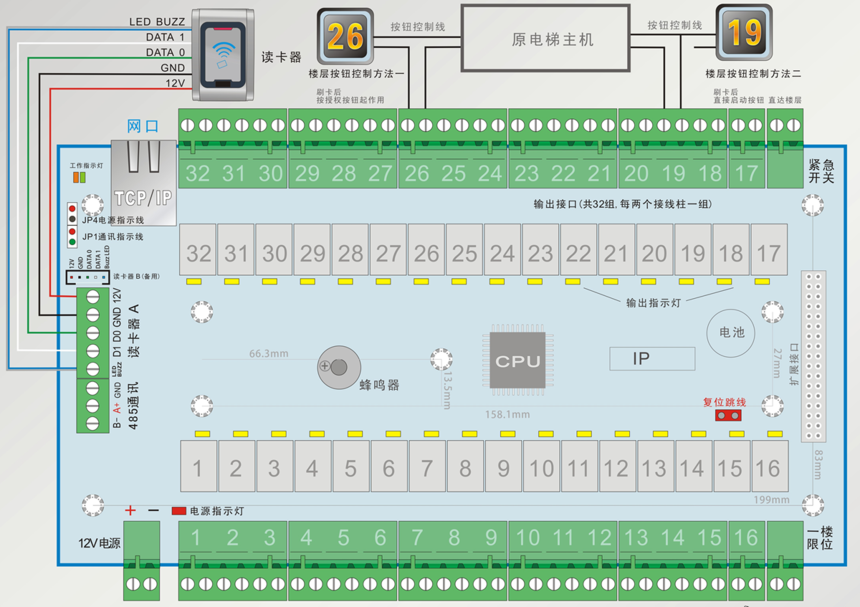
The TCP/IP (Elevator) Controller uses standard 10/100M Ethernet communication and can be installed in the same system as other devices for centralized management. High-performance 32-bit CPU processor; Standard 10/100M TCP/IP communication.
Large-capacity Flash chip, capable of storing information of 120,000 cards and 200,000 records;
32 output channels.
Onboard 1-way 485 communication, which can be used for intercom, expansion, and elevator linkage functions;
Each main board can be connected to 1 expansion board to achieve 64 outputs.
Adding a collection board to support the visitor function.
Supports the function of directly reaching the floor (16-floor mode), and with the configuration of the expansion board, it supports directly reaching 32 floors.
Sup
| Item | Details |
|---|
| Host Input | 12V DC |
| Current | 90mA - 120mA (excluding locks and card readers) |
| Temperature | -20°C - 50°C |
| Humidity | 10% - 95% R.H |
| Item | Single - Door Details |
|---|
| Main Board Size | 228mm × 144mm × 22 mm. The mounting holes are compatible with multi - door access control main boards. |
| Memory | 8M Flash |
| WG Card Readers | 2, compatible with HID Motorola fingerprint scanners |
| Output Interfaces | 32, can be configured as normally open or normally closed |
| Expansion | Supports 1 expansion board, achieving 64 outputs |
| Communication Interface | TCP/IP 10/100M |
| Open Time Zones | 16 open time periods, supports valid dates |
| Identification Methods | Single card, card + password, card or password, double cards, password, first - card - to - open the door |
| Door Opening Time | 1 - 65535 seconds |
| Event Alarms | Invalid card, invalid time |
| Fire Alarm | Supported |
| Card Storage Capacity | 120,000 |
| Event Record Capacity | 200,000 |
| Off - line Operation | Supported |
| Holiday Function | Supported |
| Card Validity Period | Supported |
| WEB Service | Embedded WEB service |
| Timers | 8 groups of timers |
| Remote Door Opening | Supported |
The access control host uses WG card readers as card - reading input devices, with communication protocols such as WG26/34. There are Reader A and Reader B, representing entry and exit respectively.
The sound and light control line has two wires on the card reader, which can be connected together. If not connected, it is impossible to determine whether the card - swiping is valid through sound and light. The wire colors may vary depending on the model and manufacturer, and wiring should be done according to the actual identification.
The controller provides 32 output interfaces. All output interfaces are dry contacts, which means they have a switching function. They can be defined as normally open or normally closed through the controller attributes in the software or jumper settings, and are used to control the on - off of devices.
Each group of output terminals consists of a normally open (normally closed) contact and a common terminal. The common terminal must be connected during wiring, and then the normally open or normally closed contact should be selected according to the device to be controlled.
General Wiring Method:
Power positive pole —— Common terminal (COM)
Normally closed NC (Normally open NO) —— Positive pole of the controlled device
Negative pole of the controlled device —— Power negative pole
The controller provides a first - floor limiter input and a mode change input, which can control whether to enable the elevator controller.
A collection board can be connected in groups to implement the visitor function.
The 485 data of the intercom system can also be used to receive its information and implement the intercom - linked visitor function.
Hardware Reset Operation Steps:
Disconnect the power supply.
Remove the reset jumper (JP1).
Power on and wait for 2 seconds.
The controller beeps twice.
Power off.
Insert the jumper.
Power on to complete the reset.
Reset Instructions: After a hardware reset, all parameters will return to their default values, and all records will be deleted. If the status light of the controller flashes rapidly after the reset, it indicates that the reset was unsuccessful.
The records of the controller are stored in the Flash. If the record capacity is exceeded, the earliest records will be overwritten.
ports the manual fire alarm mode.
Through 485 communication, the input of a third-party intercom protocol is optional;
Optionally, it can directly output to the elevator controller system through 485.
The output can be defined as normally open or normally closed (both hardware and software can be modified).
For the door opening time zone, multiple corresponding door opening methods can be set respectively, such as card access, card + password access, card or password access, password access, double-card access, first-card-to-open-the-door access, etc.;
Supports remote operation of door opening and closing, as well as remote switching;
Supports real-time status display;
Supports 2 Weigend card readers, which can automatically adapt to the 26, 34, and 37 protocols, and the supported protocols can be configured by oneself;
Supports 8 groups of timer functions, and various timing functions can be configured, such as opening certain floors during a certain period of a certain week;
Supports mixed installation with other 485 access control systems and TCP/IP controllers, and can be managed by the same software;
Embedded WEB server, all settings can be made through a browser, including real-time status display and records.